

A computer has more keyboard symbols than just letters and numbers. Sometimes you need to know a slash, backslash, backtick, tilde, or caret.
These keyboard symbols also include punctuation and other typographical marks. This guide shows the name of every computer keyboard symbol.
Contents
U.S. keyboard symbols
Here is the typical U.S. keyboard on a Windows computer. Windows adds a Windows Key (Win Key) and a Menu key on the bottom row.
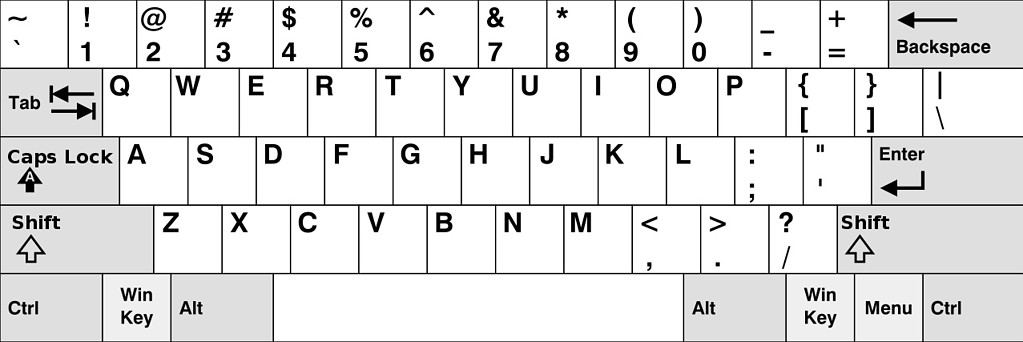
A Mac keyboard adds a Command ⌘ key near the Control and Option keys on the bottom row.
Keyboard symbols names
Here is a list of all keyboard symbols and their names.
| Keyboard Symbols | Name |
|---|---|
| ` | grave, grave accent, backtick, back quote |
| ~ | tilde |
| ! | exclamation, exclamation point, bang |
| @ | at, at sign, at symbol |
| # | pound, pound sign, hash, hashtag, number sign, octothorpe |
| $ | dollar sign, currency sign |
| % | percent, percent sign, parts per 100 |
| ^ | carat, hat, circumflex, exponent |
| & | and, ampersand |
| * | asterisk |
| ( | open bracket, open parenthesis, left parenthesis |
| ) | close bracket, close parenthesis, right parenthesis |
| ( ) | parentheses, brackets, round brackets |
| – | hyphen, minus, minus sign, dash |
| _ | underscore |
| = | equals, equal sign |
| + | addition, plus sign |
| [ ] | brackets, square brackets |
| [ | open bracket |
| ] | close bracket |
| { } | braces, curly brackets |
| { | open brace |
| } | close brace |
| \ | backslash, backward slash, reverse solidus |
| / | slash, forward slash, solidus |
| | | vertical pipe, pipe |
| ; | semicolon |
| : | colon |
| ‘ | apostrophe, prime, single quote |
| “ | quotation mark, double quotes |
| , | comma |
| . | period, decimal, dot |
| <> | angle brackets |
| < | less than |
| > | greater than |
| ? | question mark |
Symbols on a Windows Keyboard
There are several modifier keys for both Mac and Windows. These keys perform special functions such as copy, paste, save, and print.
The Windows key was introduced in 1994. It is also called the start key on Windows keyboards.
| Key | Windows |
|---|---|
| Alt or Option | Alt |
| Caps Lock | Caps Lock |
| Command | Cmd |
| Control | Ctrl |
| Delete | Backspace |
| Escape | Esc |
| Enter, Return | Enter |
| Function | Fn |
| Shift | Shift |
| Tab | Tab |
| Windows | Windows, Win, Start, Super key |
Symbols on a Mac Keyboard
The command key or ⌘ symbol on the Mac was first introduced in 1980. It allows many shortcuts on the Mac. The control key, or Ctrl, has a similar function in Windows.
| Key | Mac |
|---|---|
| Alt or Option | ⌥ |
| Caps Lock | Caps Lock |
| Command | ⌘, cmd |
| Control | ⌃ |
| Delete | Delete |
| Escape | Esc |
| Enter, Return | ⏎ |
| Function | fn |
| Shift | ⇧ |
| Tab | Tab |
One popular use of the modifier keys is in Excel spreadsheets. See the Excel Shortcuts for Windows and Mac.
Special Symbols Using Keyboard Shortcuts
There are special symbols that use keyboard shortcuts. Some symbols are for currency, editing, math, or other functions.
Symbols using Windows shortcuts
This table shows the special symbol names and how to produce them with Windows shortcuts.
| Symbol | Name | Windows |
|---|---|---|
| £ | pound, pound sterling | Alt + 0163 |
| $ | dollar or currency | Shift + 4 |
| ¢ | cent | Alt + 0162 |
| € | euro | Alt + Ctrl + E |
| ¥ | Japanese yen, Chinese yuan | Alt + 0165 |
| ∞ | infinity | Alt+236 |
| § | section, silcrow | Alt + 0167 |
| ¶ | paragraph, pilcrow | Alt + 0182 |
| ™ | trademark | Alt + 0153 |
| © | copyright | Alt + 0169 |
| ® | registered trademark | Alt + 0174 |
| • | bullet | Alt + 0149 |
| º | degree | Alt + 0176 |
| ± | plus or minus | Alt + 177 |
| ≠ | not equal sign, inequality | Alt + 8800 |
| ≈ | approximately | Alt + 247 |
| ∑ | upper case sigma, summation | Alt + 931 |
| π | lower case pi | Alt + 960 |
| ∏ | upper case pi | Alt + 227 |
| √ | square root, radical | Alt + 251 |
| % | percent, parts per 100 | Shift + 5 |
| ‰ | per mille, parts per 1000 | Alt + 0137 |
| ÷ | division | Alt + 247 |
| ≤ | less than or equal to | Alt + 243 |
| ≥ | greater than or equal to | Alt + 8805 |
| † | dagger, cross | Alt + 0134 |
| ‡ | double dagger, double cross | Alt + 0135 |
| … | ellipsis | Alt + 0133 |
| – | en dash | Alt + 0150 |
| — | em dash | Alt + 0151 |
| ∆ | upper case delta, change | Alt + 30 |
| Ω | upper case omega | Alt + 234 |
| µ | lower case mu, mean, micro | Alt + 230 |
For more keyboard shortcuts, see the Keyboard Symbols Shortcuts Cheatsheet.
Symbols using Mac shortcuts
This table shows the special symbol names and how to produce them with Mac shortcuts.
| Symbol | Name | Mac Shortcut |
|---|---|---|
| £ | pound, pound sterling | Option + 3 (US) Shift + 3 (UK) |
| $ | dollar or currency | Shift + 4 |
| ¢ | cent | Option + 4 |
| € | euro | Option + Shift + 2 (US) Option + 2 (UK) |
| ¥ | Japanese yen, Chinese yuan | Option + y |
| ∞ | infinity | Option + 5 |
| § | section, silcrow | Option + 6 |
| ¶ | paragraph, pilcrow | Option + 7 |
| ™ | trademark | Option + 2 |
| © | copyright | Option + g |
| ® | registered trademark | Option + r |
| • | bullet | Option + 8 |
| º | degree | Option + Shift +8 |
| ± | plus or minus | Option + Shift + = |
| ≠ | not equal sign, inequality | Option + = |
| ≈ | approximately | Option + x |
| ∑ | upper case sigma, summation | Option + w |
| π | lower case pi | Option + p |
| ∏ | upper case pi | Option + Shift + p |
| √ | square root, radical | Option + v |
| % | percent, parts per 100 | Shift + 5 |
| ‰ | per mille, parts per 1000 | Option + Shift + r |
| ÷ | division | Option + / |
| ≤ | less than or equal to | Option + , |
| ≥ | greater than or equal to | Option + . |
| † | dagger, cross | Option + t |
| ‡ | double dagger, double cross | Option + Shift + 7 |
| … | ellipsis | Option + ; |
| – | en dash | Option + – |
| — | em dash | Option + Shift + – |
| ∆ | upper case delta, change | Option + j |
| Ω | upper case omega | Option + z |
| µ | lower case mu, mean, micro | Option + m |
For more keyboard shortcuts, see the Keyboard Symbols Shortcuts Cheatsheet.